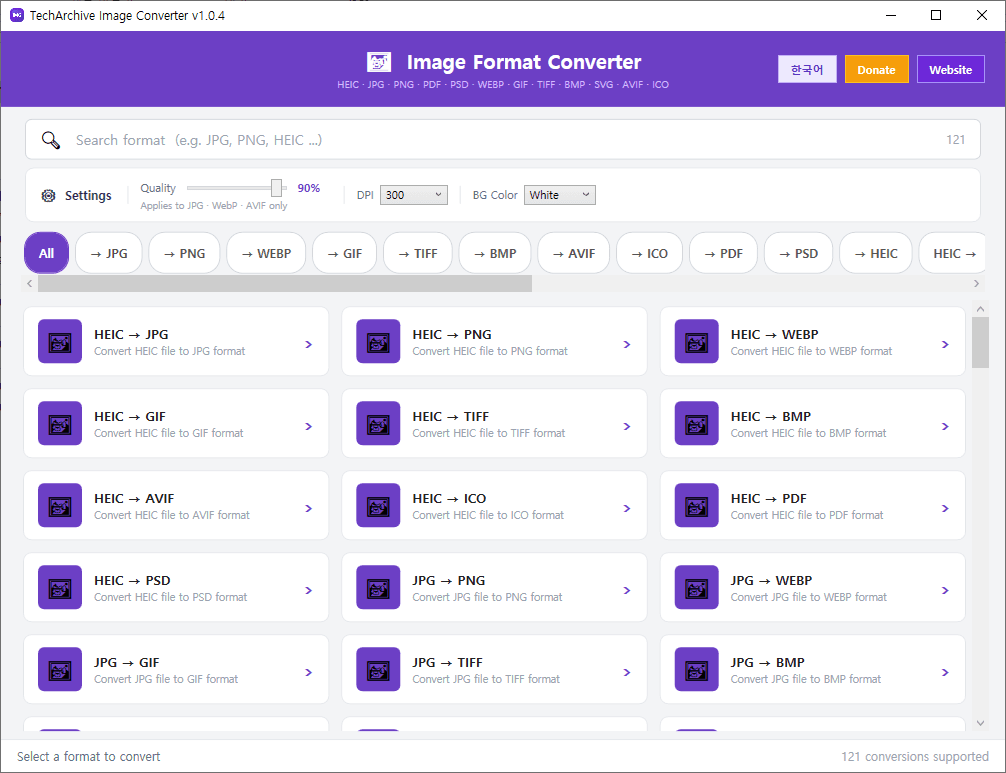
TechArchive Image Converter is a free and lightweight image conversion program that helps you quickly and easily convert image files between multiple formats.
It supports conversion between JPG, PNG, WEBP, GIF, TIFF, BMP, AVIF, ICO, PDF, PSD, HEIC, and SVG, and also allows batch conversion by selecting multiple files at once, making it useful for image organization, web-ready exports, and format compatibility tasks.
It also includes practical conversion options. You can adjust output quality when converting to JPG, WEBP, and AVIF, and set DPI when working with formats such as PDF and SVG. When converting transparent images to formats that do not support transparency, such as JPG, BMP, or PDF, you can also choose a background color for better results.
Key features:
Supports conversion between JPG, PNG, WEBP, GIF, TIFF, BMP, AVIF, ICO, PDF, PSD, HEIC, and SVG
Supports batch conversion of multiple image files
Supports output quality settings for JPG, WEBP, and AVIF
Supports DPI settings for PDF, SVG, and similar formats
Supports background color selection for transparent image conversion
Supports ICO conversion
Supports various image formats including HEIC, PSD, and PDF
Supports automatic update check when the program starts
Recommended environment:
Windows 10 / Windows 11 64-bit
How to install:
Download the file below and extract it to install the program.
If you find any bugs or have feature requests, please leave a comment.
TechArchive Image Converter는 다양한 이미지 파일을 쉽고 빠르게 변환할 수 있는 무료 경량 이미지 변환 프로그램입니다.
JPG, PNG, WEBP, GIF, TIFF, BMP, AVIF, ICO, PDF, PSD, HEIC, SVG 형식 변환을 지원하며, 여러 파일을 한 번에 선택해 일괄 변환할 수 있어 이미지 정리, 웹 업로드용 변환, 포맷 호환 작업에 편리합니다.
변환 옵션도 함께 제공합니다. JPG, WEBP, AVIF 변환 시 출력 품질을 조절할 수 있고, PDF나 SVG 같은 형식을 처리할 때는 DPI 설정도 지원합니다. 투명 배경이 포함된 이미지를 JPG, BMP, PDF처럼 투명을 지원하지 않는 형식으로 변환할 때는 배경색도 선택할 수 있어 실사용에 유용합니다.
주요 기능:
JPG, PNG, WEBP, GIF, TIFF, BMP, AVIF, ICO, PDF, PSD, HEIC, SVG 변환 지원
여러 파일 동시 선택 및 일괄 변환 지원
JPG, WEBP, AVIF 출력 품질 설정 지원
PDF, SVG 등 변환 시 DPI 설정 지원
투명 배경 이미지 변환 시 배경색 선택 지원
ICO 변환 지원
HEIC, PSD, PDF 등 다양한 이미지 형식 변환 지원
프로그램 시작 시 자동 업데이트 확인 지원
권장 환경:
Windows 10 / Windows 11 64비트
설치 방법:
아래 파일을 다운로드한 뒤 압축을 풀면 설치할 수 있습니다.
버그가 있거나 추가 요청사항이 있으면 댓글을 남겨주세요
변경 기록
Update URL Change
Release
카테고리 & 태그
Similar Downloads


