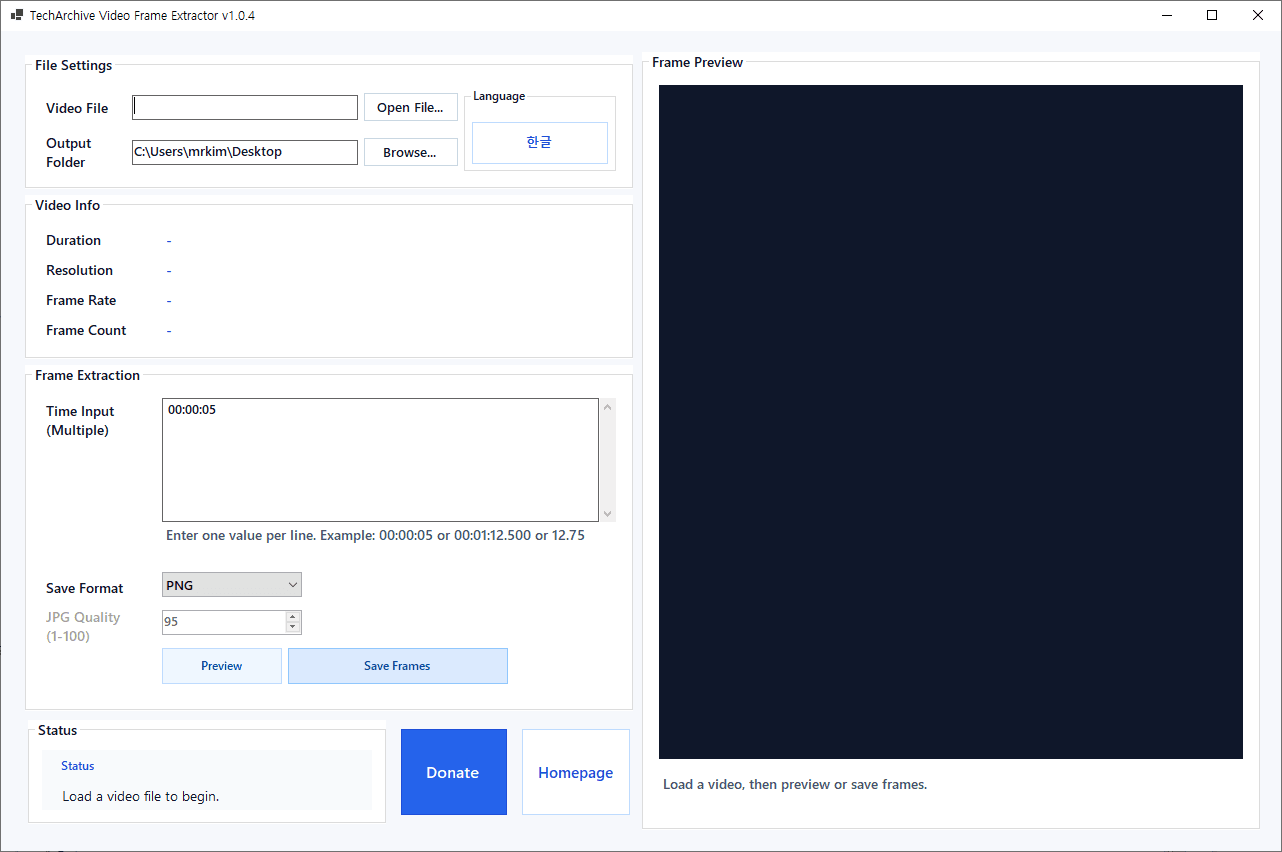
TechArchive Video Frame Extractor is a lightweight free Windows utility that helps you capture exact frames from video files and save them as image files.
You can load a video, enter one or more time points, preview the frame at a selected moment, and save the extracted frames in PNG, JPG, or BMP format.
The program supports a wide range of video formats including mp4, avi, mov, mkv, wmv, flv, webm, m4v, ts, mpeg, and mpg.
This makes it useful for creating thumbnails, saving still cuts from videos, collecting reference images, or extracting important scenes for documentation and content work.
You can enter multiple time values at once, with one value per line, and the program will extract and save all matching frames in one batch.
It also includes a preview feature so you can check the selected frame before saving, which is especially helpful when you need precise captures.
The interface provides video information such as duration, resolution, frame rate, and frame count after a file is loaded.
It also supports drag-and-drop video loading, English/Korean language switching, and automatic update checking when the program starts.
Key Features:
Extract frames from video files at exact time points
Preview a selected frame before saving
Batch extract multiple frames from multiple time inputs
Save extracted images as PNG, JPG, or BMP
Adjust JPG quality when saving in JPG format
Supports drag-and-drop video loading
Displays duration, resolution, frame rate, and frame count
Supports English and Korean UI switching
Automatically checks for updates when the program starts
Recommended Environment:
Windows 10 / Windows 11 64-bit
Installation:
Download the installer file below and run it to install the program.
If you find any bugs or have any feature requests, please leave a comment.
TechArchive Video Frame Extractor는 동영상 파일에서 원하는 시점의 프레임을 정확하게 추출해 이미지로 저장할 수 있는 무료 경량 Windows 유틸리티입니다.
비디오 파일을 불러온 뒤 시간 값을 입력하면 해당 시점의 프레임을 미리보기로 확인하고, PNG, JPG, BMP 형식으로 저장할 수 있습니다.
이 프로그램은 mp4, avi, mov, mkv, wmv, flv, webm, m4v, ts, mpeg, mpg 등 다양한 동영상 형식을 지원합니다.
그래서 영상 썸네일 제작, 특정 장면 저장, 참고 이미지 추출, 문서 작성용 캡처 정리 같은 작업에 편리하게 사용할 수 있습니다.
시간 값은 한 줄에 하나씩 여러 개 입력할 수 있으며, 입력한 모든 시점의 프레임을 한 번에 일괄 저장할 수 있습니다.
또한 저장 전에 미리보기 기능으로 선택한 장면을 먼저 확인할 수 있어, 원하는 프레임을 더 정확하게 추출할 수 있습니다.
비디오를 불러오면 재생 길이, 해상도, 프레임레이트, 총 프레임 수 같은 영상 정보도 함께 표시됩니다.
드래그 앤 드롭으로 동영상 파일을 바로 불러올 수 있고, 영어/한국어 UI 전환과 프로그램 시작 시 자동 업데이트 확인 기능도 지원합니다.
주요 기능:
동영상 파일에서 원하는 시간대의 프레임 추출
저장 전 선택 프레임 미리보기 지원
여러 시간 입력값 기준 일괄 프레임 추출
PNG, JPG, BMP 형식 저장 지원C
JPG 저장 시 품질 조절 가능
드래그 앤 드롭으로 동영상 파일 불러오기 지원
재생 길이, 해상도, 프레임레이트, 총 프레임 수 표시
영어/한국어 UI 전환 지원
프로그램 시작 시 자동 업데이트 확인 지원
권장 환경:
Windows 10 / Windows 11 64비트
설치 방법:
아래 설치 파일을 다운로드한 뒤 실행하면 설치할 수 있습니다.
버그가 있거나 추가 요청사항이 있으면 댓글을 남겨주세요.
변경 기록
Release
카테고리 & 태그
Similar Downloads


